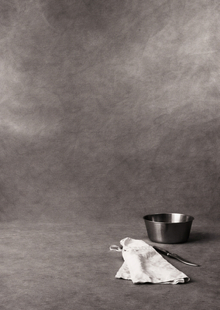
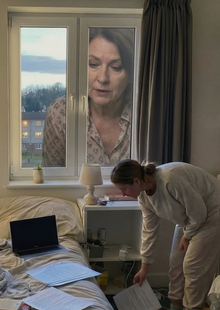
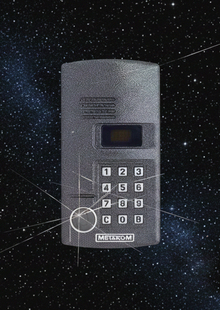
Моменты, когда система дает сбой и формирует абстрактные образы предметов. Возникает разрыв между тем, что видит человек, и тем, что обнажается технологиями. Искажения меняют форму объектов, создавая ложные детали. Серия фотографий демонстрирует уязвимость зрительного опыта и подчеркивает разницу между человеческим взглядом и взглядом цифровых алгоритмов.
Исходный размер 1920x1080
«Ошибка восприятия» — это серия бытовых фотографий, вдохновленных медиаискусством. Были выбраны повседневные сюжеты, чтобы показать искажение простых вещей. Основной задачей было восстановить объекты на искаженных снимках с помощью нейросети, и показать разницу между реальностью и результатом цифровых алгоритмов.
Степень искажения влияет на точность восстановления. Чем чище исходный фрагмент, тем точнее нейросеть определяет форму и детали. Сильные сбои снижают качество результата и меняют итоговый образ. Проект рассматривает фотографию как нестабильный архив. Искажения превращают изображения в фрагменты утраченной памяти.
DAFES — платформа, объединяющая лучшие проекты и продукты экосистемы по направлениям design, art, fashion, education и startup. Внутри неё действует сообщество Deziiign, которое объединяет дизайнеров, художников, иллюстраторов и фотографов — профессионалов всех творческих направлений. Это пространство для демонстрации работ, обмена идеями и неординарными подходами, а также встреч с потенциальными заказчиками, исполнителями и партнёрами. На платформе Deziiign уже опубликовано почти 60 000 проектов от начинающих специалистов и признанных мастеров.
Наши эксперты оценивают проекты сообщества Deziiign — здесь вы видите актуальные итоги этой экспертизы. Перед вами — галерея самых интересных работ, получивших высокие оценки экспертного совета DAFES.
design
art
fashion
education
startups
Показать еще
Мы используем файлы cookies для улучшения работы сайта и большего удобства его использования. Более подробную информац...
Показать больше
Press space bar to start a drag.
When dragging you can use the arrow keys to move the item around and escape to cancel.
Some screen readers may require you to be in focus mode or to use your pass through key
Press space bar to start a drag.
When dragging you can use the arrow keys to move the item around and escape to cancel.
Some screen readers may require you to be in focus mode or to use your pass through key
Press space bar to start a drag.
When dragging you can use the arrow keys to move the item around and escape to cancel.
Some screen readers may require you to be in focus mode or to use your pass through key
Press space bar to start a drag.
When dragging you can use the arrow keys to move the item around and escape to cancel.
Some screen readers may require you to be in focus mode or to use your pass through key
Press space bar to start a drag.
When dragging you can use the arrow keys to move the item around and escape to cancel.
Some screen readers may require you to be in focus mode or to use your pass through key
Press space bar to start a drag.
When dragging you can use the arrow keys to move the item around and escape to cancel.
Some screen readers may require you to be in focus mode or to use your pass through key
Press space bar to start a drag.
When dragging you can use the arrow keys to move the item around and escape to cancel.
Some screen readers may require you to be in focus mode or to use your pass through key
Press space bar to start a drag.
When dragging you can use the arrow keys to move the item around and escape to cancel.
Some screen readers may require you to be in focus mode or to use your pass through key
Press space bar to start a drag.
When dragging you can use the arrow keys to move the item around and escape to cancel.
Some screen readers may require you to be in focus mode or to use your pass through key
Press space bar to start a drag.
When dragging you can use the arrow keys to move the item around and escape to cancel.
Some screen readers may require you to be in focus mode or to use your pass through key
Press space bar to start a drag.
When dragging you can use the arrow keys to move the item around and escape to cancel.
Some screen readers may require you to be in focus mode or to use your pass through key
Press space bar to start a drag.
When dragging you can use the arrow keys to move the item around and escape to cancel.
Some screen readers may require you to be in focus mode or to use your pass through key
Press space bar to start a drag.
When dragging you can use the arrow keys to move the item around and escape to cancel.
Some screen readers may require you to be in focus mode or to use your pass through key
Press space bar to start a drag.
When dragging you can use the arrow keys to move the item around and escape to cancel.
Some screen readers may require you to be in focus mode or to use your pass through key
Press space bar to start a drag.
When dragging you can use the arrow keys to move the item around and escape to cancel.
Some screen readers may require you to be in focus mode or to use your pass through key
Press space bar to start a drag.
When dragging you can use the arrow keys to move the item around and escape to cancel.
Some screen readers may require you to be in focus mode or to use your pass through key